# Vllm Latency(TTFT) Spike on load Tesing
**URL:** https://discuss.vllm.ai/t/vllm-latency-ttft-spike-on-load-tesing/1396
**Category:** General
**Created:** [August 15, 2025, 6:03pm UTC](https://discuss.vllm.ai/t/vllm-latency-ttft-spike-on-load-tesing/1396 "2025-08-15T18:03:58Z")
**Posts on this page:** 10
**Page:** 1
### Author:  [@saifulislam79](https://discuss.vllm.ai/u/saifulislam79)
#### Post date: [August 15, 2025, 6:03pm UTC](https://discuss.vllm.ai/t/vllm-latency-ttft-spike-on-load-tesing/1396/1 "2025-08-15T18:03:58Z")

I have run 40 concurrent per request with 40 run and then got spike of some request processing. please let me know how can i will solve this issue and i will grade-full to you.

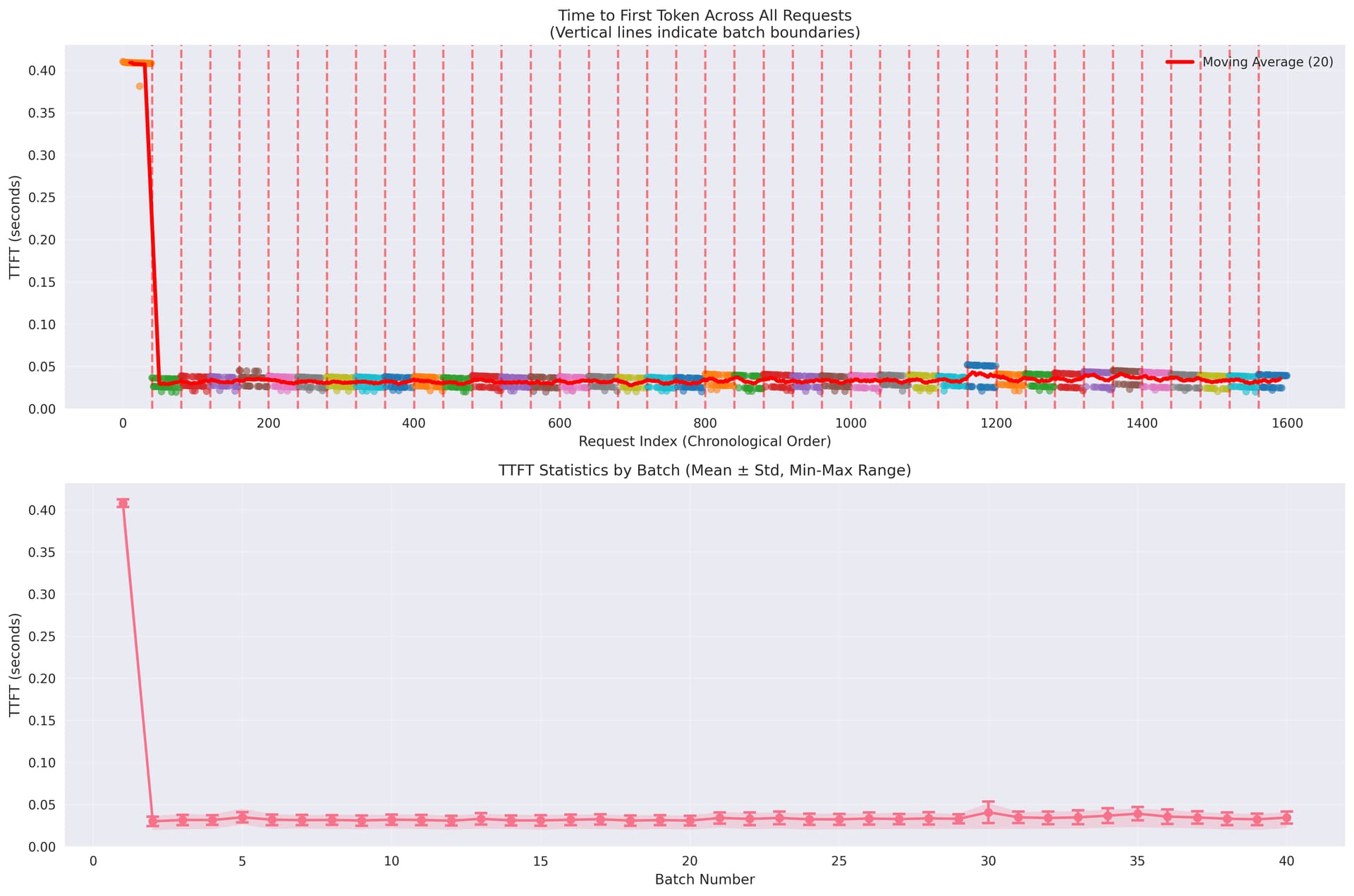
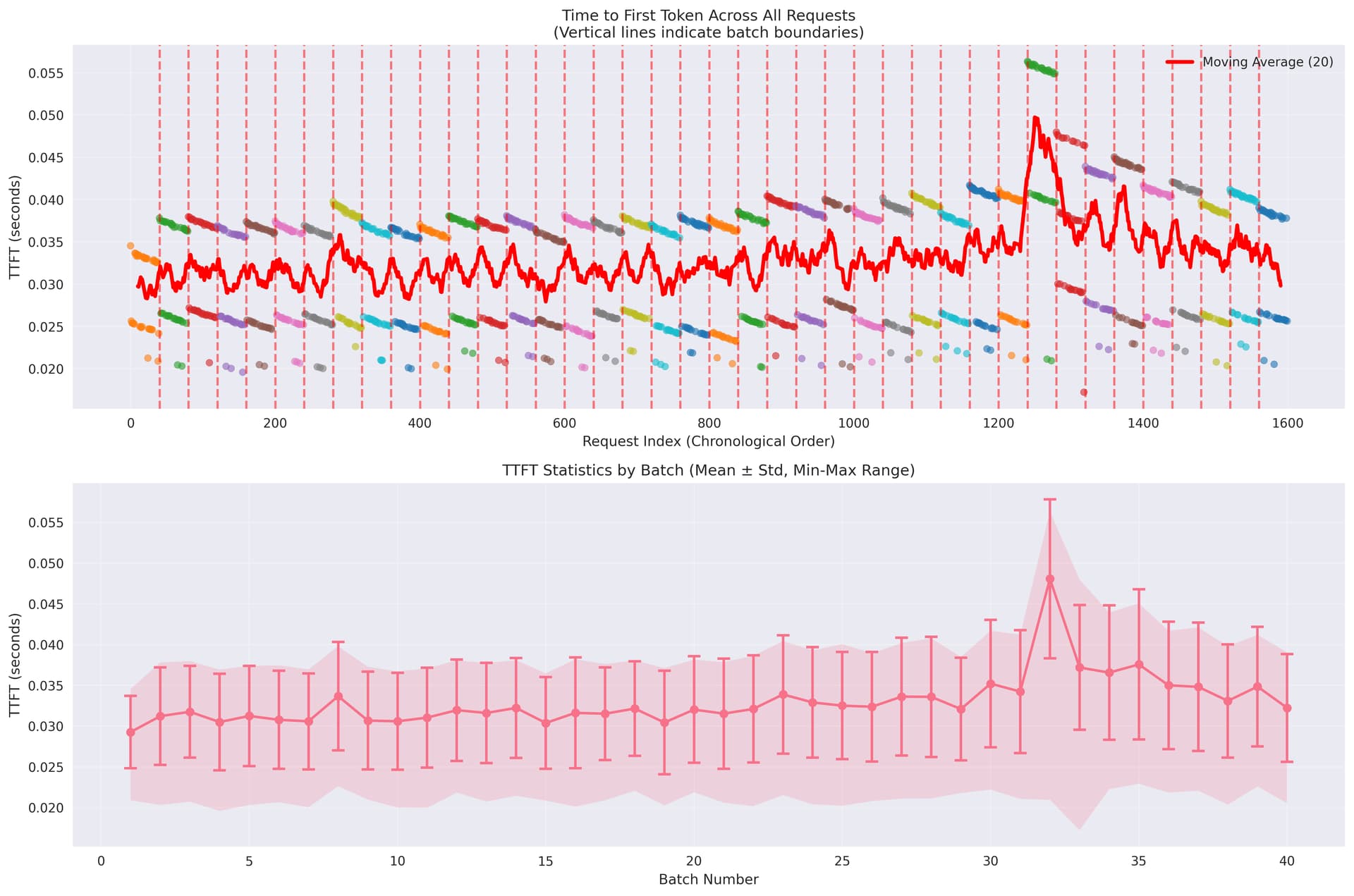
Git Issue:[[Bug]: How to setup stable latency on VLLM for streaming · Issue #22970 · vllm-project/vllm · GitHub](https://github.com/vllm-project/vllm/issues/22970)
---
### Author:  [@RunLLM](https://discuss.vllm.ai/u/RunLLM)
#### Post date: [August 15, 2025, 6:05pm UTC](https://discuss.vllm.ai/t/vllm-latency-ttft-spike-on-load-tesing/1396/2 "2025-08-15T18:05:05Z")
The spikes in Time to First Token (TTFT) you observed during high concurrency are a known issue in vLLM, especially when the system is under heavy load or when batch sizes approach hardware or configuration limits. This can be caused by factors such as insufficient KV cache space, suboptimal batch scheduling, or preemption/recomputation events. To mitigate these spikes, you can try the following:
- **Increase `gpu_memory_utilization`** to allocate more KV cache space, reducing the likelihood of preemption and recomputation delays.
- **Decrease `max_num_seqs` or `max_num_batched_tokens`** to reduce batch size, which can help lower TTFT spikes at the cost of some throughput.
- **Increase `tensor_parallel_size` or `pipeline_parallel_size`** if you have multiple GPUs, to better distribute memory and computation, but be aware of potential synchronization or latency trade-offs.
- **Monitor preemption events** using Prometheus metrics or logs to confirm if preemption is causing the spikes, and adjust the above parameters accordingly.
For more details and tuning strategies, see [Optimization and Tuning](https://docs.vllm.ai/en/latest/configuration/optimization.html) and [related GitHub discussions](https://github.com/vllm-project/vllm/issues/3096). Would you like a step-by-step guide on how to apply these changes or interpret the metrics?
Sources:
- [Optimization and Tuning](https://docs.vllm.ai/en/latest/configuration/optimization.html)
- [GitHub Issue: critical slowness to reach first token as concurrency grows](https://github.com/vllm-project/vllm/issues/3096)
---
### Author:  [@saifulislam79](https://discuss.vllm.ai/u/saifulislam79)
#### Post date: [August 15, 2025, 6:23pm UTC](https://discuss.vllm.ai/t/vllm-latency-ttft-spike-on-load-tesing/1396/3 "2025-08-15T18:23:40Z")
```auto
engine_kwargs = {
```
```auto
# quantization: Enables FP8 quantization for model weights. While 'fp8' can reduce memory and increase speed,
```
```auto
# simple per-tensor FP8 might not yield optimal performance or could degrade quality due to dynamic scale calculations or outlier issues.[9, 10]
```
```auto
# For optimal quality, consider calibrated scales or PTPC-FP8 (on AMD ROCm).[11, 12]
```
```auto
"quantization": "fp8",
```
```auto
#kv_cache_dtype: Storing Key-Value (KV) cache data in FP8 significantly enhances memory efficiency,
```
```auto
# effectively doubling the maximum token capacity within the same memory footprint.[6, 7, 8]
```
```auto
# This directly boosts the number of concurrent requests. Supported on CUDA 11.8+ and ROCm.[7]
```
```auto
"kv_cache_dtype": "fp8",
```
```auto
"gpu_memory_utilization": 0.80,
```
```auto
```
```auto
# max_num_batched_tokens: Maximum total tokens across all sequences in a single batch.
```
```auto
# Crucial for prefill efficiency. VLLM recommends setting this > 2048 for optimal throughput.[15]
```
```auto
"max_num_batched_tokens": 4096, # Set to a value > 2048
```
```auto
# tokenizer_mode: Controls the tokenizer implementation. "auto" attempts to use a fast, Rust-based tokenizer,
```
```auto
# which significantly reduces CPU overhead and prevents GPU idle time.[16, 17]
```
```auto
"tokenizer_mode": "auto",
```
```auto
# disable_log_stats: Disables detailed performance statistics logging.
```
```auto
# This reduces CPU overhead in high-throughput production environments, freeing resources for inference.[18, 19]
```
```auto
"disable_log_stats": True,
```
```auto
# max_seq_len_to_capture: Maximum sequence length for which CUDA graphs are employed.
```
```auto
# Tune to encompass the majority of expected sequence lengths to maximize CUDA graph utilization.[22]
```
```auto
"max_seq_len_to_capture": 2048, # Should ideally match max_model_len for consistent CUDA graph usage
```
```auto
# "max_model_len": 16384, # Should match max_seq_len_to_capture
```
```auto
"max_num_seqs": 32,
```
```auto
"tensor_parallel_size": 1,
```
```auto
"enable_chunked_prefill": False, # Explicitly set to False to prioritize prefill operations, optimizing TTFT
```
```auto
# "dtype": torch.bfloat16, # Explicitly set dtype for clarity and consistency
```
```auto
# "use_cuda_graphs": True, # Enable CUDA graphs for performance optimization
```
```auto
# "use_flash_attention": True, # Enable flash attention for faster inference
```
```auto
"trust_remote_code": True,
```
```auto
}
```
This is also configuration but same issue
---
### Author:  [@RunLLM](https://discuss.vllm.ai/u/RunLLM)
#### Post date: [August 15, 2025, 6:24pm UTC](https://discuss.vllm.ai/t/vllm-latency-ttft-spike-on-load-tesing/1396/4 "2025-08-15T18:24:25Z")
Your `engine_kwargs` are mostly valid, but a few points need clarification:
- `"quantization": "fp8"` and `"kv_cache_dtype": "fp8"` are supported and will reduce memory usage and increase throughput, but for best accuracy, use calibrated scales (see [Quantized KV Cache docs](https://docs.vllm.ai/en/latest/features/quantization/quantized_kvcache.html)).
- `"enable_chunked_prefill": False` is not recommended in vLLM V1, as chunked prefill is always enabled by default and improves throughput and latency ([Optimization and Tuning](https://docs.vllm.ai/en/latest/configuration/optimization.html)). Setting it to `False` may not have any effect.
All other parameters are supported and align with vLLM’s documented configuration. Would you like a step-by-step explanation of each parameter or advice on further tuning?
Sources:
- [Quantized KV Cache](https://docs.vllm.ai/en/latest/features/quantization/quantized_kvcache.html)
- [Optimization and Tuning](https://docs.vllm.ai/en/latest/configuration/optimization.html)
---
### Author:  [@saifulislam79](https://discuss.vllm.ai/u/saifulislam79)
#### Post date: [August 15, 2025, 6:26pm UTC](https://discuss.vllm.ai/t/vllm-latency-ttft-spike-on-load-tesing/1396/5 "2025-08-15T18:26:07Z")
> [@RunLLM](#):
>
> enable\_chunked\_prefi=True
I have also used but found same issue
---
### Author:  [@RunLLM](https://discuss.vllm.ai/u/RunLLM)
#### Post date: [August 15, 2025, 6:26pm UTC](https://discuss.vllm.ai/t/vllm-latency-ttft-spike-on-load-tesing/1396/6 "2025-08-15T18:26:51Z")
Setting `enable_chunked_prefill=True` is the default in vLLM V1, and chunked prefill is always enabled for improved throughput and latency. If you are still experiencing the same issue (e.g., TTFT spikes or slowdowns), chunked prefill alone may not resolve it—other factors like KV cache size, batch size, or GPU memory utilization may be the cause ([Optimization and Tuning](https://docs.vllm.ai/en/latest/configuration/optimization.html)).
If you need to further reduce TTFT spikes, try increasing `gpu_memory_utilization`, decreasing `max_num_seqs`, or tuning `max_num_batched_tokens`. Would you like a step-by-step guide for these adjustments?
Sources:
- [Optimization and Tuning](https://docs.vllm.ai/en/latest/configuration/optimization.html)
---
### Author:  [@saifulislam79](https://discuss.vllm.ai/u/saifulislam79)
#### Post date: [August 15, 2025, 6:29pm UTC](https://discuss.vllm.ai/t/vllm-latency-ttft-spike-on-load-tesing/1396/7 "2025-08-15T18:29:06Z")
> [@RunLLM](#):
>
> max\_num\_seqs and max\_num\_batched\_tokens
what is the optimize value of this and i need to test concurrent 40 request
---
### Author:  [@RunLLM](https://discuss.vllm.ai/u/RunLLM)
#### Post date: [August 15, 2025, 6:29pm UTC](https://discuss.vllm.ai/t/vllm-latency-ttft-spike-on-load-tesing/1396/8 "2025-08-15T18:29:36Z")
There is no universal “optimal” value for `max_num_seqs` and `max_num_batched_tokens`—they must be tuned for your hardware, model size, and workload. For 40 concurrent requests, set `max_num_seqs` to at least 40, and set `max_num_batched_tokens` to a value that balances throughput and latency (vLLM recommends \>2048 for throughput; try 4096 or higher if memory allows) ([Optimization and Tuning](https://docs.vllm.ai/en/latest/configuration/optimization.html), [GitHub Issue 2492](https://github.com/vllm-project/vllm/issues/2492)).
To find the best values, use the `auto_tune.sh` script in the vLLM repo, which benchmarks different combinations for your setup ([auto\_tune.sh README](https://github.com/vllm-project/vllm/blob/main/benchmarks/auto_tune/README.md)). Would you like a step-by-step example of how to run this script?
Sources:
- [Optimization and Tuning](https://docs.vllm.ai/en/latest/configuration/optimization.html)
- [GitHub Issue 2492](https://github.com/vllm-project/vllm/issues/2492)
- [auto\_tune.sh README](https://github.com/vllm-project/vllm/blob/main/benchmarks/auto_tune/README.md)
---
### Author:  [@saifulislam79](https://discuss.vllm.ai/u/saifulislam79)
#### Post date: [August 16, 2025, 6:54am UTC](https://discuss.vllm.ai/t/vllm-latency-ttft-spike-on-load-tesing/1396/9 "2025-08-16T06:54:12Z")
I need llama3b-instructor model vllm configuration which server 40 concurrent request without latency spike issue
---
### Author:  [@RunLLM](https://discuss.vllm.ai/u/RunLLM)
#### Post date: [August 16, 2025, 6:54am UTC](https://discuss.vllm.ai/t/vllm-latency-ttft-spike-on-load-tesing/1396/10 "2025-08-16T06:54:32Z")
To serve 40 concurrent requests with the Llama-3B-Instruct model in vLLM and minimize latency spikes, set `max_num_seqs` to at least 40 and `max_num_batched_tokens` to 4096 or higher (if GPU memory allows). Also, set `gpu_memory_utilization` to a safe high value (e.g., 0.9), and use the default chunked prefill. Example:
```python
from vllm import LLM
llm = LLM(
model="meta-llama/Llama-3.1-8B-Instruct",
max_num_seqs=40,
max_num_batched_tokens=4096,
gpu_memory_utilization=0.9
)
```
Monitor for preemption warnings and, if needed, further increase `max_num_batched_tokens` or adjust `max_num_seqs` based on your GPU memory and observed performance ([Optimization and Tuning](https://docs.vllm.ai/en/latest/configuration/optimization.html)). Would you like a detailed step-by-step tuning guide?
Sources:
- [Optimization and Tuning](https://docs.vllm.ai/en/latest/configuration/optimization.html)